Directory graphics/pgf/contrib/terminaltrees
terminaltrees
Evenly spaced leaves. Rounded branches. Ordinary Forest syntax.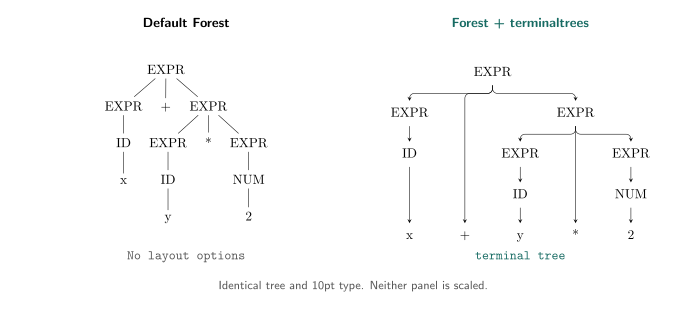
Add terminal tree to a Forest tree to align its leaves, center each parent between its first and last immediate children, and draw rounded branches. Wider labels increase spacing automatically. Unary chains connect straight down, as do children directly below their parent.
Both trees above use the same content and 10pt type, without scaling. The left tree uses Forest's default layout. The right uses the layout provided by terminaltrees, built on Forest's spacing and drawing tools.
Install and draw a tree
With a current TeX Live installation, install the package using its package manager:
tlmgr install terminaltrees
If your operating system manages TeX Live, use its package manager instead.
For manual installation, download the CTAN archive and place terminaltrees.sty beside your document, or upload it to your Overleaf project. Your TeX installation also needs Forest and needspace. Forest loads PGF/TikZ. MiKTeX users can use this manual method if the package is not in their package catalogue.
Compile this example with pdfLaTeX:
\documentclass{article}
\usepackage{terminaltrees}

\begin{document}
\begin{forest}
  terminal tree
  [EXPR
    [EXPR [ID [x]]]
    [+]
    [EXPR [EXPR [ID [y]]] [*] [EXPR [NUM [2]]]]
  ]
\end{forest}
\end{document}
This produces the right-hand tree. Remove terminal tree for the left-hand layout. Use Forest's bracket syntax and ordinary LaTeX labels, including \\ for deliberate line breaks.
Keep the type size, or fit the page
Both forms use Forest and the same layout:
- Natural size: use
forestwithterminal tree. You choose paper large enough for the tree and manage its placement, including in figures or minipages. - Fit to the existing layout: use
fittedterminaltreein ordinary single-column document flow. It shrinks the whole tree when needed and moves it to the next page if the remaining space is insufficient.
Neither form changes the paper or margins, enlarges a tree, or splits it across pages. Fitting scales labels and branches together, subject to a font-size floor:
\begin{fittedterminaltree}(minimum label size=7pt)
  roundness=0.5,
  for tree={font=\small}
  [EXPR [EXPR [x]] [+] [EXPR [1]]]
\end{fittedterminaltree}
fittedterminaltree applies terminal tree automatically. Fitting settings go in parentheses after the environment name. Forest options go before the root bracket. Omit the parentheses to use the default minimum: the document's current \footnotesize size.
The floor checks the base fonts selected with Forest's font option, after scaling. It does not measure inline font changes, subscripts or externally scaled content, and it is not a readability guarantee. If the floor cannot be met, compilation stops. Wrap wide labels, increase an undersized node font, or split the tree manually. Do not use a PDF left by a failed compilation.
Fitting supports normal flow, including lists, but rejects floats and minipages. Use forest with terminal tree in those contexts. Custom output routines, multicolumn layouts and automatic captions are unsupported by the fitting form.
The manual includes a side-by-side comparison on different paper sizes. To generate it, see the Check and preview section below.
Adjust the layout
Put layout options after terminal tree, or before the root bracket in fittedterminaltree:
| Option | Default | Effect |
|---|---|---|
leaf pitch |
0pt |
Minimum distance between leaf centers. Zero leaves spacing entirely to label measurements and Forest's padding. |
roundness |
1 |
Curve factor from 0 (square) to 1 (largest bends that fit). Does not move nodes or change fitting. |
For example, terminal tree, leaf pitch=3em, roundness=0.5 sets a minimum leaf spacing and tighter bends. Both options reset for each tree. Forest's font, label, arrow and vertical-spacing options remain available.
Equal leaf spacing does not imply equal internal sibling spacing. A parent is centered over its immediate children, not necessarily all its descendant leaves. A wide label can widen the whole tree. This is conservative spacing, not a minimum-width layout.
The style controls horizontal positions and branch routing. Custom anchors, shifted labels, overlays, edge labels and custom arrow styles need visual inspection. The manual documents the geometry, measurement limits and unsupported overrides in detail. The distribution archive includes the compiled terminaltrees-doc.pdf.
Tested with pdfLaTeX on TeX Live 2023 (Ubuntu) and TeX Live 2026 (macOS). Other engines and Overleaf execution have not been verified. The package does not add tagged-PDF tree semantics or screen-reader support.
Check and preview
From the checkout or extracted archive, run:
python3 terminaltrees-tests/check.py --preview
The checker needs Python 3, pdflatex, pdfinfo, pdftotext, pdftocairo, and the standalone class. It prints the temporary directory containing the PDFs and SVG. Geometry and rendering checks run without requiring the generated SVG to match the committed one.
Open fitting-overview.pdf for a shared-scale comparison of natural-size and fitted trees. fitting-comparison.pdf contains the actual-size pages and a third page showing deliberate unfitted overflow. You choose the paper in both cases. The example uses leaf pitch=16mm, not the default. Use the same zoom on each actual-size page to preserve the comparison.
Without --preview, the checker also requires a byte-for-byte match with the README SVG. To replace that image after all checks pass, run:
python3 terminaltrees-tests/check.py --update-readme-image
Different TeX, font or Poppler versions can change the SVG without changing the layout. Review the rendering before accepting an image update.
GitHub previews and the README image
PR checks upload validated renderings as tree-previews-… artifacts, retained for 14 days. They never commit or push. New revisions cancel only that PR's older run.
The image workflow rebuilds the vector comparison after pushes to main, runs the checks, and commits only if the image changed. Failed checks leave the previous image in place. The example source defines one tree shared by both sides of the comparison.
Build the manual and distribution archive
Run the checker first, then build with Python 3 and the TeX dependencies:
python3 terminaltrees-tests/check.py --preview
python3 build-ctan.py /path/to/new-output-directory
The output directory must not exist. The builder creates terminaltrees-doc.pdf and terminaltrees.zip. The ZIP contains the files listed in manifest.txt under terminaltrees/.
Versioning
Version numbers follow Semantic Versioning for the documented environments and options. Incompatible interface changes require a new major version.
License, credits and support
Copyright 2026 Adi Edelhaus. Licensed under the LaTeX Project Public License, version 1.3c or later. Maintenance status: maintained. Current maintainer: Adi Edelhaus.
Report an issue. The work's files are listed in manifest.txt.
Built on Forest by Sašo Živanović, PGF/TikZ, the LaTeX kernel and needspace. These dependencies retain their own licenses and are not bundled.
Download the contents of this package in one zip archive (453.7k).
Terminaltrees – Evenly spaced leaves and rounded branches for Forest trees
terminaltrees adds a layout style to forest for trees with evenly spaced terminal leaves on a shared baseline. It centers each parent between its first and last immediate children and draws rounded side branches. Label measurements determine spacing automatically.
The package uses ordinary forest bracket syntax. An optional fittedterminaltree environment shrinks the whole tree to the existing page layout, subject to a minimum label size. It can move the tree to the next page but does not change the paper size or split trees across pages.
| Package | Terminaltrees |
| Bug tracker | |
| Announcements | |
| Repository | |
| Version | 1.0.1 |
| Licenses | The LaTeX Project Public License 1.3c |
| Copyright | 2026 Adi Edelhaus |
| Maintainer | Adi Edelhaus |
| Contained in | TeX Live as terminaltrees MiKTeX as terminaltrees |
| Topics | PGF TikZ Tree |