Directory macros/latex/contrib/chatui
<picture> <source media="(prefers-color-scheme: dark)" srcset="https://raw.githubusercontent.com/TechyNilesh/chatui/main/assets/banner-dark.png">
</picture>

Preview • Install • Overleaf • Usage • Environments • Customization • Examples • Full docs
A LaTeX package for typesetting AI chat transcripts: user/assistant messages, reasoning ("thinking") traces, tool-call traces, and image/file attachments, styled as a **terminal**, **web**, or **desktop** chat UI, in light or dark theme. ## Preview | Web | Terminal (dark) | |---|---| | 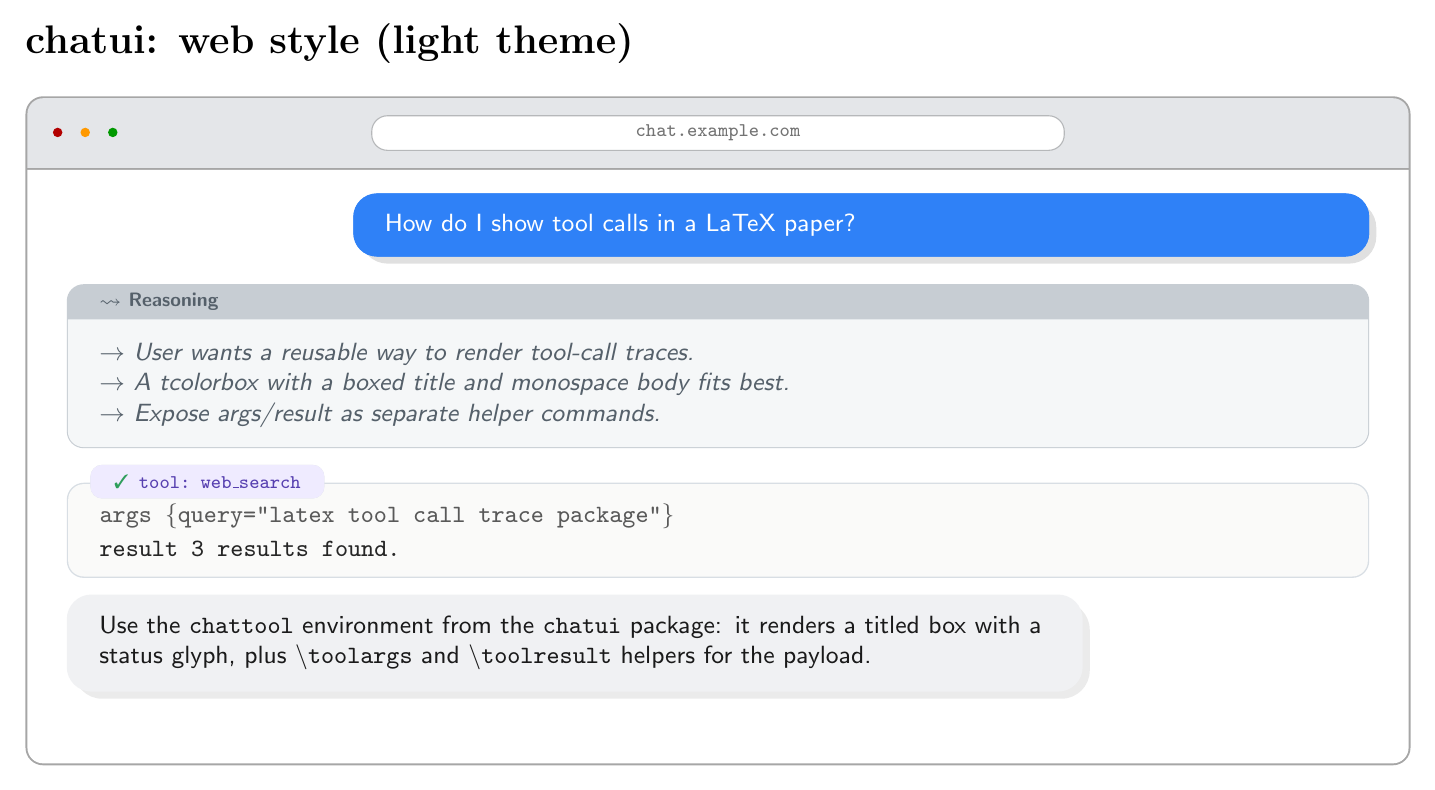 | 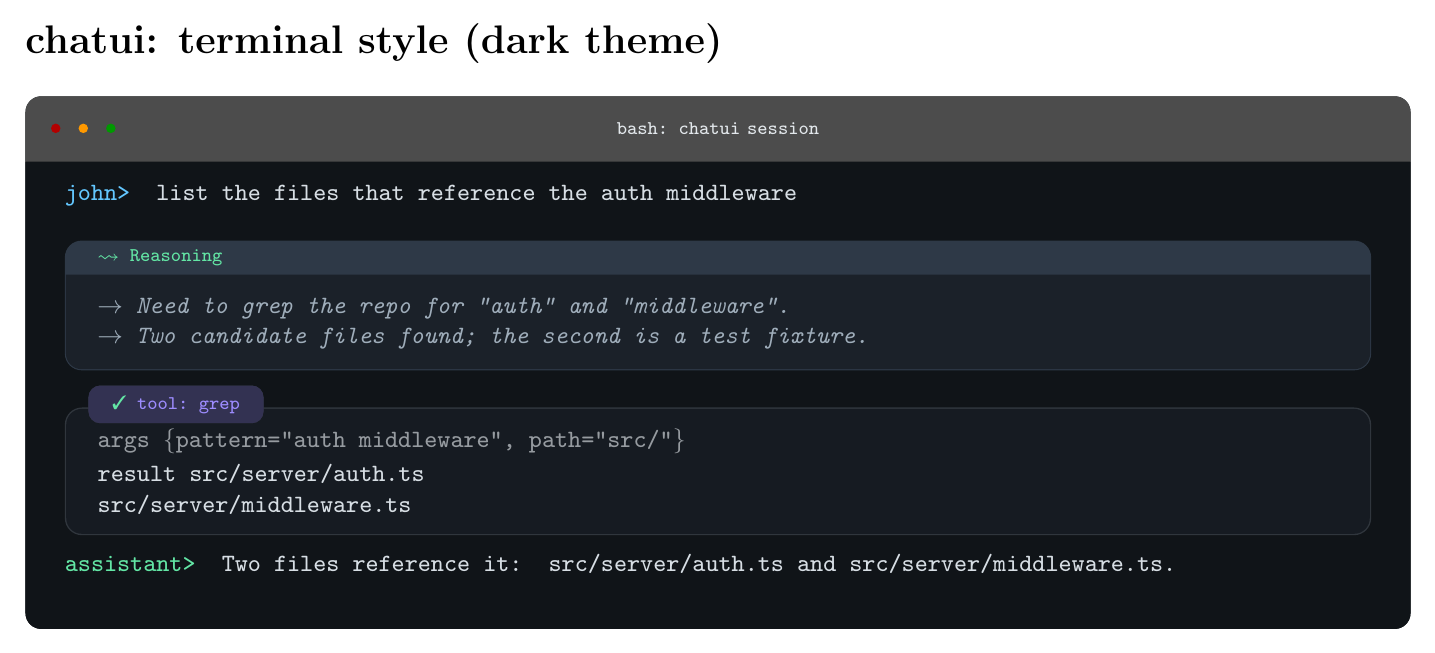 | | Desktop | Tool-call kinds (cli / code / api) | |---|---| | 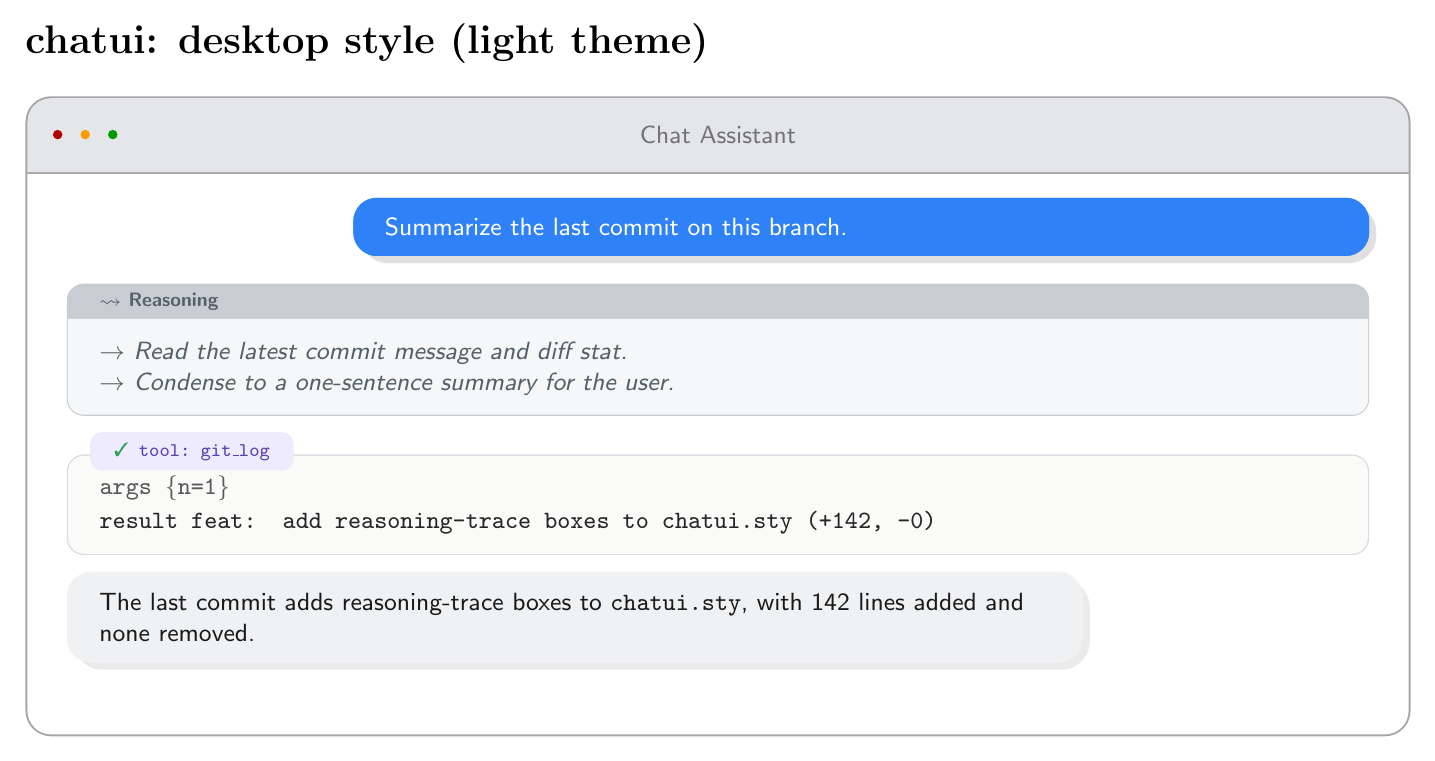 | 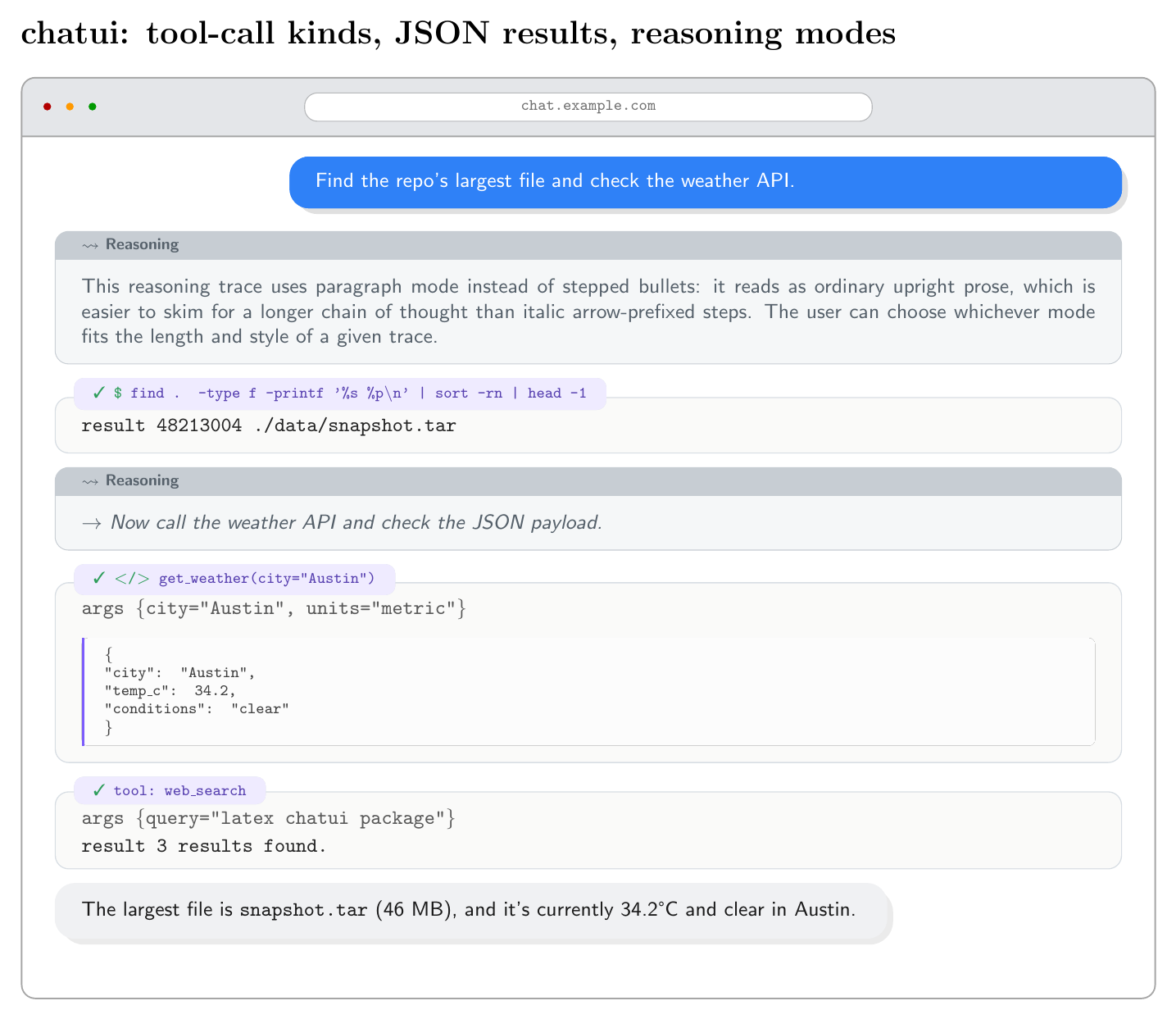 | More combinations (light/dark per style, attachments, page breaks, custom themes) are in [`examples/`](examples/). ## Install **Quickest:** drop `chatui.sty` next to your `.tex` file. Works anywhere, no path setup needed. **From CTAN**, once published: `tlmgr install chatui` (TeX Live) or via the MiKTeX package manager. **From GitHub**, for the latest version before it hits CTAN, or to track a specific commit: ```sh git clone https://github.com/TechyNilesh/chatui.git ``` Then either copy `chatui.sty` next to your project, or install it into your personal texmf tree so every document on your machine can find it: ```sh mkdir -p "$(kpsewhich -var-value TEXMFHOME)/tex/latex/chatui" cp chatui/chatui.sty "$(kpsewhich -var-value TEXMFHOME)/tex/latex/chatui/" texhash "$(kpsewhich -var-value TEXMFHOME)" # or: mktexlsr ``` (`kpsewhich -var-value TEXMFHOME` prints your personal texmf root, e.g. `~/texmf` on Linux, `~/Library/texmf` on macOS, or `%USERPROFILE%\texmf` on Windows with MiKTeX.) ## Using on Overleaf Overleaf doesn't have a texmf tree you can install into directly, but a single `.sty` file works fine as a project upload: 1. Download [`chatui.sty`](https://raw.githubusercontent.com/TechyNilesh/chatui/main/chatui.sty) (right-click -> Save As, or `curl -O` it). 2. In your Overleaf project, click **New File -> Upload** (or drag and drop) and add `chatui.sty` to the project root, the same folder as your main `.tex` file. 3. Use it exactly as documented: `\usepackage[style=web]{chatui}`. No further setup needed. Overleaf finds any `.sty` file sitting next to your document automatically. Once `chatui` is accepted on CTAN, Overleaf will eventually pick it up through its own periodic TeX Live sync, and `\usepackage{chatui}` will work without uploading anything. That sync isn't instant though, so the manual upload above is the reliable path in the meantime. ## Usage ```latex \usepackage[style=web]{chatui} % style = terminal | web | desktop \begin{chatconversation}[chat.example.com] \begin{chatuser}[John Doe] How do I show tool calls in a LaTeX paper? \end{chatuser} \begin{chatthinking} \tstep{User wants a reusable way to render tool-call traces.} \tstep{A titled box with a monospace body fits best.} \end{chatthinking} \begin{chattool}{web_search} \toolargs{query="latex tool call trace package"} \toolresult{3 results found.} \end{chattool} \begin{chatassistant} Use the \texttt{chattool} environment: it renders a titled box with a status glyph, plus \texttt{\textbackslash toolargs} and \texttt{\textbackslash toolresult} helpers. \end{chatassistant} \end{chatconversation} ``` ## Environments | Environment | Purpose | |---|---| | `chatconversation[title]` | Outer window chrome (terminal bar / browser bar / macOS title bar) | | `chatuser[name]` | User message bubble | | `chatassistant[name]` | Assistant message bubble | | `chatthinking[title][mode]` | Reasoning/thinking trace box. `mode` = `steps` (default, use `\tstep{...}` per bullet) \| `paragraph` (plain upright prose). | | `chattool[status][kind]{name}` | Tool-call trace box. `status` = `ok` \| `error` \| `running`. `kind` = `api` (default, "tool: name" chip) \| `cli` (shell-style "$ name") \| `code` (function-call style "</> name"). Use \toolargs{...}, \toolresult{...}, and \tooljson{...} inside. |
\chatimage[width]{path} and \chatfile{name}{size}: use inside chatuser/chatassistant (or standalone) to show an attached image or file. \chatimage clips to the bubble's own corner radius; \chatfile renders a small bordered chip with a document icon, filename, and size. See examples/x-tool-kinds/example-attachments.tex.
Package options
style:terminal(monospace, shell-prompt look),web(rounded chat bubbles + browser chrome, default), ordesktop(macOS-style window with traffic-light dots).theme:auto(default: terminal is dark, web/desktop are light),light, ordark. Dark mode uses the same palette across all three styles.
Customizing colors
Every color is a plain xcolor name, redefine any of them after loading the package, with a named color, a mix, or a raw hex code:
\usepackage[style=web]{chatui}
\colorlet{chatuiUserBg}{teal}                    % named xcolor
\colorlet{chatuiAssistantBg}{gray!10}             % mixed
\definecolor{chatuiToolAccent}{HTML}{7C5CFC}      % raw hex
Available: chatuiUserBg/Fg, chatuiAssistantBg/Fg/Border, chatuiThinkBg/Border/Fg, chatuiToolBg/Border/Accent, chatuiOk, chatuiErr, chatuiWarn (status glyphs and chattool accents), plus the window-chrome colors chatuiAppBg/Text/Chrome/ChromeText, chatuiAppPillBg/Border/Text (web/desktop) and the chatuiTerm* family (terminal style). See examples/x-tool-kinds/example-custom-theme.tex for a worked example.
Customizing fonts
Two hooks control every font family in the package. Redefine them after \usepackage (and after loading any font package you want to use):
\usepackage{fourier}                                % example serif font
\renewcommand{\chatuiFontSans}{\rmfamily}            % web/desktop bubbles, prose
\renewcommand{\chatuiFontMono}{\ttfamily}            % terminal + tool/code text
Only sizing (\small, \scriptsize) is fixed internally, tuned to each box's proportions; the family is entirely yours to swap.
Long conversations and page breaks
The outer chatconversation window is breakable and splits cleanly across pages: the chrome (title bar, dots) only draws once, on the first page, and the border/background continue seamlessly on later pages. Individual messages, reasoning boxes, and tool calls are each a single atomic unit (they don't break mid-box), so a page break always falls between two messages, never through the middle of one, matching how a real chat UI never splits a single message bubble. A message far longer than a full page is an unsupported edge case. See examples/x-tool-kinds/example-long-conversation.tex.
Examples
Organized by style under examples/:
examples/
  desktop/       example-desktop-light.tex, example-desktop-dark.tex
  terminal/      example-terminal-light.tex, example-terminal-dark.tex
  web/           example-web-light.tex, example-web-dark.tex
  x-tool-kinds/  example-tool-kinds.tex  (cli/code/api tool calls, JSON, reasoning modes)
Dark theme uses the same palette across all three styles. Pass theme=dark explicitly, or leave theme unset with style=terminal (terminal defaults to dark; web/desktop default to light).
Each .tex file has a matching .pdf already built alongside it. To recompile one yourself, point TEXINPUTS two levels up so pdflatex can find chatui.sty:
cd examples/web
TEXINPUTS=../..: pdflatex example-web-light.tex
Requirements
tcolorbox ([most] libraries), tikz, etoolbox, kvoptions, xcolor, pifont. All standard, on any full TeX Live / MiKTeX install.
Citation
If chatui is useful in a paper, report, or other published work, please cite it:
@software{chatui2026,
  author  = {Verma, Nilesh},
  title   = {{chatui}: A LaTeX Package for Typesetting AI Chat Transcripts},
  year    = {2026},
  version = {1.0.0},
  url     = {https://github.com/TechyNilesh/chatui},
  note    = {LaTeX Project Public License (LPPL) 1.3c}
}
A machine-readable citation is also available in CITATION.cff (GitHub surfaces this automatically via the "Cite this repository" button).
License
LPPL 1.3c. See LICENSE.
Download the contents of this package in one zip archive (247.8k).
Chatui – Typeset AI chat transcripts as terminal, web, or desktop chat UIs
This package typesets AI chat transcripts: user/assistant
messages, reasoning (thinking
) traces, tool-call traces, and file/image
attachments, styled as a terminal, web, or desktop chat UI, in light or dark
theme. It is meant for papers, reports, and documentation that need to show a
worked conversation with an AI assistant, including the reasoning and tool
calls behind a response.
| Package | Chatui |
| Home page | |
| Support | |
| Bug tracker | |
| Announcements | |
| Repository | |
| Developers | |
| Version | 1.0.0 |
| Licenses | The LaTeX Project Public License |
| Copyright | 2026 Nilesh Verma |
| Maintainer | Nilesh Verma |
| Contained in | TeX Live as chatui MiKTeX as chatui |
| Topics | Quotation |
| See also |